Self-serve analytics and tag-based row-level security in ClickHouse
When you ingest telemetry from thousands of robots, every customer ends up asking for the same thing: they want to slice their own data without waiting on us to build a custom chart.
I built Formant’s self-serve analytics stack — first on Snowflake, and later migrated to ClickHouse (WITH FILL STEP for gap-filled time series, ECharts on the frontend, and composable dashboard modules). Moving to ClickHouse made queries dramatically faster, though every once in a while ClickHouse reminds you it was built by people who consider UPDATE a moral failing.
Here are a few of the more interesting problems that came up along the way: row-level security over arbitrary tag sets, type coercion traps, and a caching mistake that quietly hurt the rest of the platform.
Row-level security over hierarchical tag sets #
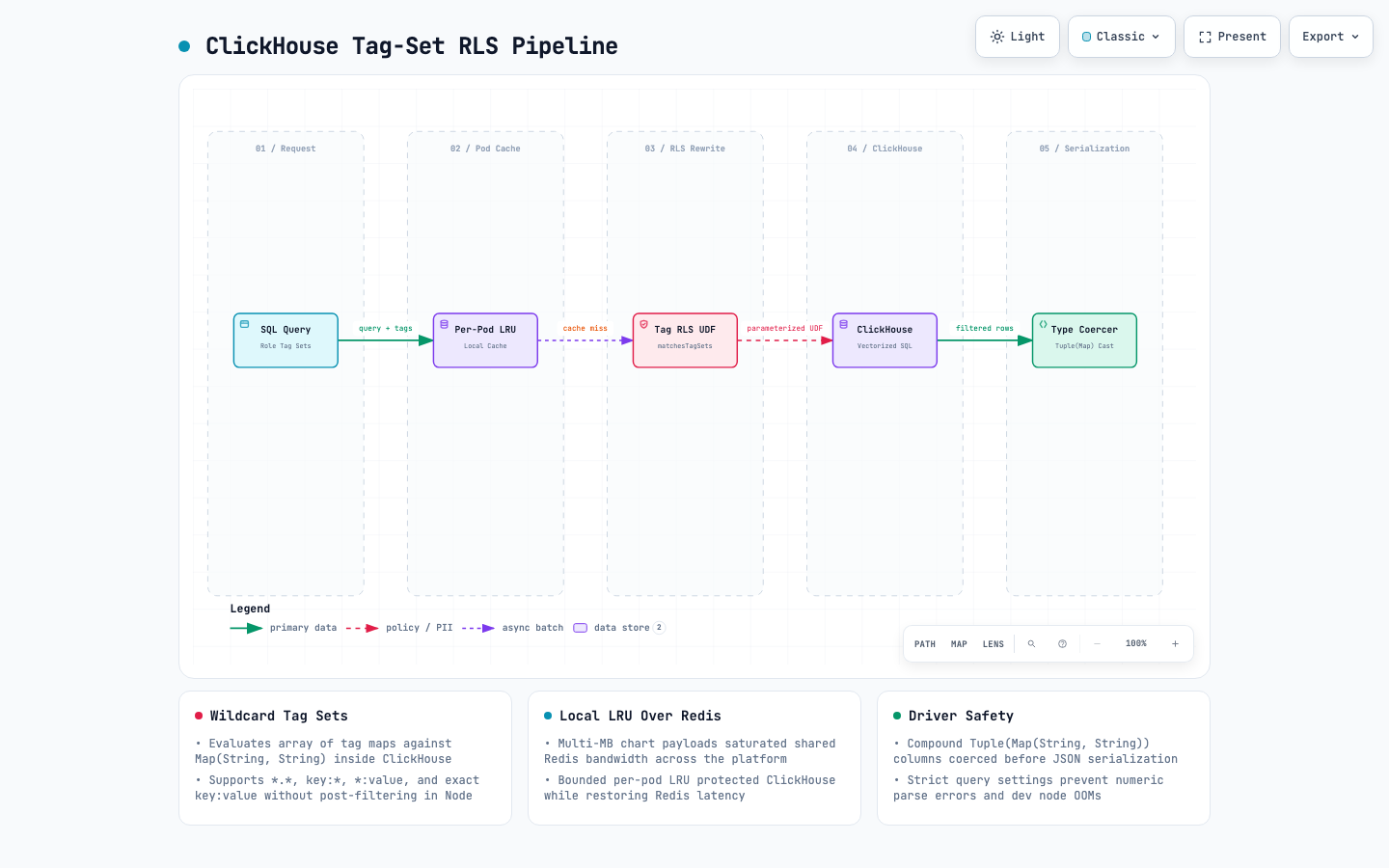
In Formant, access control isn’t a simple WHERE org_id = ?. Every device and telemetry stream has a map of tags (Map(String, String) in ClickHouse), and a user’s role grants access to a set of tag sets — including wildcards like location:*, *:production, or *:*.
When customers write or run self-serve SQL queries, we have to enforce those tag constraints at the row level without letting anyone bypass them.
I added SQL templating with a ClickHouse user-defined function (matchesTagSets) that evaluates an array of allowed tag maps against each row’s tags column. Under the hood, the predicate compiles down to higher-order array and map functions:
SELECT COUNT(1) AS value
FROM query_event
WHERE time >= parseDateTimeBestEffort('2024-03-20T00:00:00Z')
  AND time <= parseDateTimeBestEffort('2024-03-21T00:00:00Z')
  AND arrayExists(
    tagset -> empty(tagset) OR mapAll(
      (tag_key, tag_values) -> arrayExists(
        tag_value ->
          (tag_key = '*' AND tag_value = '*')
          OR (tag_value = '*' AND mapContains(tags, tag_key))
          OR (tag_key = '*' AND arrayExists(k -> tags[k] = tag_value, mapKeys(tags)))
          OR tags[tag_key] = tag_value,
        tag_values
      ),
      tagset
    ),
    JSONExtract(
      '[{"fleet":["delivery"],"env":["prod"]}]',
      'Array(Map(String, Array(String)))'
    )
  )
LIMIT 1000
Wrapping this in a matchesTagSets(tags, ':TagSets') UDF meant our query builder could inject the caller’s resolved permission sets directly into parameterized queries:
const query: ISqlQuery = {
  tags: [{ fleet: ["delivery"], env: ["prod"] }],
  sqlQuery: "SELECT * FROM query_battery WHERE matchesTagSets(tags, ':TagSets')",
};
That gave us full wildcard coverage (*:*, key:*, *:value, and exact key:value) inside ClickHouse’s vectorized execution engine without pulling rows into Node to filter them.
Making self-serve charts resilient #
Letting users write SQL or pick arbitrary streams and group-bys means the UI can’t assume fixed column names. To make charts work out of the box, I built a ChartBuilder abstraction and a sqlColumnFinder() utility that inspects the returned ClickHouse column metadata to infer time axes, numeric series, and string partitions automatically:
const chart = new ChartBuilder(rows, metadata)
  .xAxis({ dataType: "timestamp", name: "time" })
  .yAxis(["Percentage", "Charge", "Voltage"])
  .partitionBy(["STREAM_NAME", "DEVICE_ID"])
  .fillGaps({ start: query.start, end: query.end, aggregateLevel: "day" });
Two ClickHouse quirks bit us in production once customers started throwing weird schemas at it:
- Compound types crashing the JS driver. Selecting columns typed as
Tuple(Map(String, String))didn’t serialize cleanly into JavaScript objects and blew up memory onquery_numeric_set. Inspecting the column metadata first and casting compound tuple/map columns to strings at the query boundary fixed the crashes immediately. - Numeric literal constraints in settings. Passing JS-formatted numeric strings with underscores (
_000_000) into ClickHouse query settings threwCannot parse input: expected 'eof' before: '_000_000', while leaving query memory unconstrained OOM’d dev nodes on heavy scans. Tightening the ClickHouse settings serializer fixed both.
When a shared Redis cache is worse than a local LRU #
Initially, I moved our analytics query cache from in-memory to Redis so multiple API pods wouldn’t re-run the same heavy Snowflake/ClickHouse queries when a whole team opened the same dashboard.
On paper that sounds right. In practice, analytics payloads are large. Under heavy dashboard traffic (especially large enterprise fleets), serializing and shipping multi-megabyte chart payloads through Redis saturated Redis bandwidth and increased latency for everything else sharing that Redis instance — presence checks, auth caches, and feature flags.
I ripped the Redis analytics cache back out and replaced it with a bounded per-pod local LRU cache, plus a much shorter TTL whenever a query returned 0 rows (so freshly ingested data wouldn’t stay hidden behind an empty-result cache hit). Pod-level cache hit rates stayed high enough to protect ClickHouse, and Redis latency across the rest of the platform dropped back to normal.